Whop Downloader vs. Downloader for Whop (serp.co): Full Comparison
Whop Downloader vs. serp.co's Downloader for Whop, compared feature by feature — bulk course downloads, PDFs, subtitles, pricing, and reviews, checked against both listings directly.
Searching for a downloader for Whop turns up two extensions in most results: Whop Downloader (this extension) and Downloader for Whop, published by serp.co at $17/month. Below is a direct, feature-by-feature comparison, checked against both Chrome Web Store listings rather than relying on marketing copy from either side.
Whop Downloader (this extension)
- Free tier: 3 full video+audio MP4 downloads every week, forever, no signup, no email, no credit card. Audio-only and video-only downloads are separately unlimited — always free, no cap, on every plan.
- Whole-course bulk download: point it at a course and it scans the lesson list, then works through every lesson automatically, in order, into a single named folder. It's a Pro feature, currently marked beta, and it needs the optional local helper app — the full walkthrough is here.
- PDF and course resource downloads: captures and saves lesson-attached PDFs directly, the same download flow as video.
- Subtitle downloads: saves .vtt subtitle files alongside the video on every download path where captions are available, automatically.
- A local helper app, optional, for hour-plus lessons where the in-browser merge can run out of memory. Normal downloads don't need it — video and audio merge inside the browser.
- Pricing: $9.99/month, $79.99/year, or $99.99 one-time for lifetime access. This is early-access pricing while the product is still growing its user base — it reflects where we are now, not a permanent ceiling.
- Rating: mid-4 stars across a few dozen Chrome Web Store reviews at the time of writing.
Downloader for Whop (serp.co)
- Free tier: requires an email signup before your first download, then gives you 3 downloads. Based on the public listing, this reads as a one-time trial allowance rather than something that resets — meaning after those 3, you're paying.
- Bulk "Download Visible": grabs whatever's visible on the current page — video, images, and text — in one action.
- Image and text capture: in addition to video, it pulls page images and text content into separate tabs in its interface.
- Pricing: $17/month for unlimited downloads. No free tier beyond the initial trial, and no annual or lifetime option listed on the public listing.
- Rating: a small number of ratings (under 10) on the Chrome Web Store at the time of writing, averaging in the low-2-star range.
Side by side
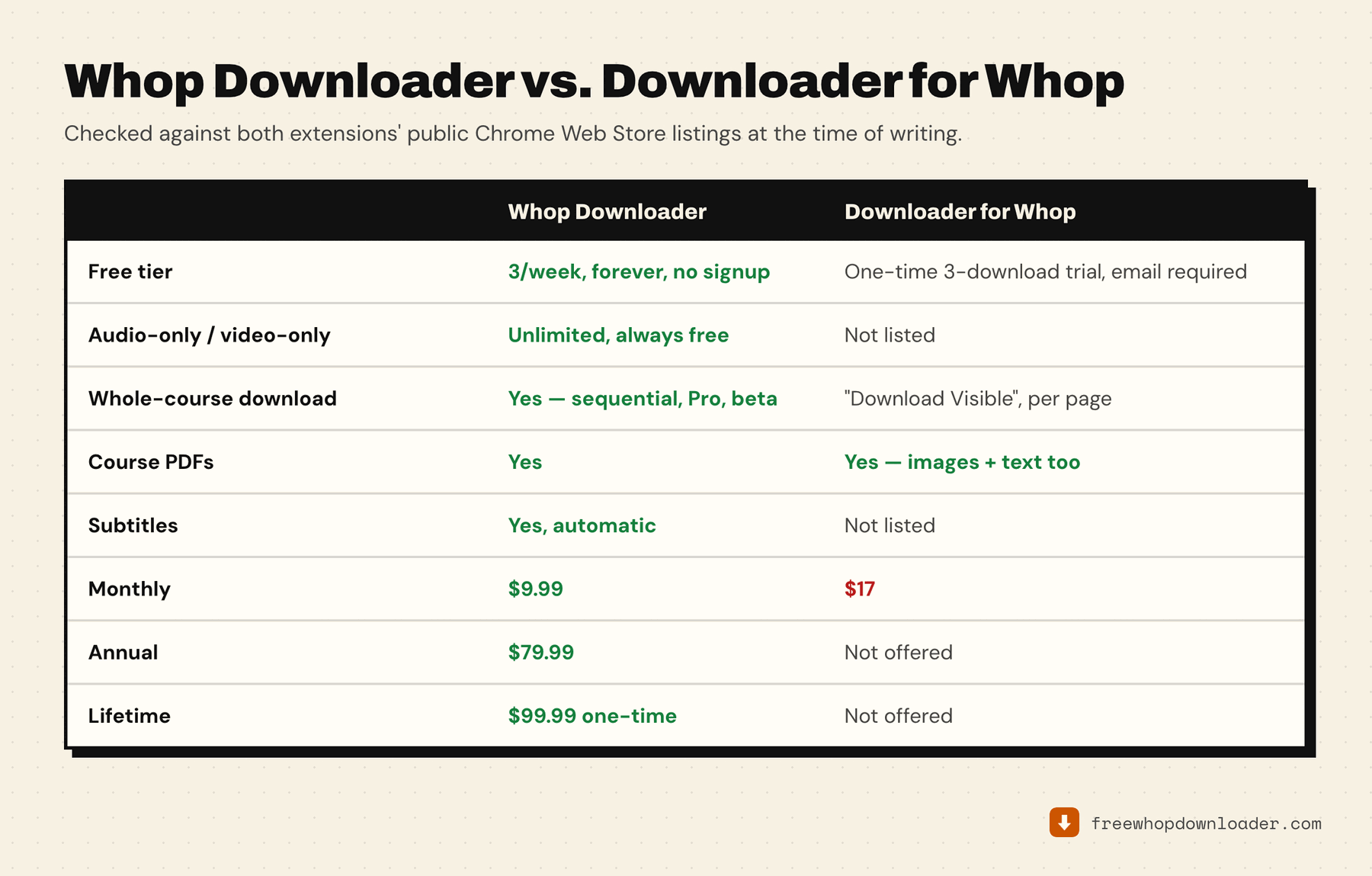
| Whop Downloader | Downloader for Whop | |
|---|---|---|
| Free tier | 3 full downloads/week, forever, no signup | One-time 3-download trial, email required |
| Audio/video-only | Unlimited, always free | Not offered |
| Whole-course bulk download | Yes — automated and sequential (Pro, beta) | Yes — "Download Visible," per-page |
| PDF / resource downloads | Yes | Yes (images + text) |
| Subtitle downloads | Yes, automatic | Not listed |
| Monthly | $9.99 | $17 |
| Annual | $79.99 | Not offered |
| Lifetime | $99.99 one-time | Not offered |
| Chrome Web Store rating | Mid-4/5, a few dozen reviews | Under 10 reviews, low 2-star average |
If you'd rather see the whole field, including the non-extension routes, that's in every free Whop downloader compared.
Both tools cover the fundamentals — video downloads, some form of bulk saving, and additional resource capture beyond just video. The meaningful differences are in the details: Whop Downloader's free tier renews every week indefinitely rather than granting a one-time trial, its bulk download is built specifically to walk an entire course start to finish rather than grab whatever's currently on screen, and it adds subtitle downloads and a genuine lifetime pricing option that the competing listing doesn't offer.
Review counts, ratings, and pricing on any Chrome Web Store listing can change — always check the current listing yourself before deciding. The structural differences (recurring free tier vs. one-time trial, sequential whole-course automation vs. per-page bulk grab, lifetime pricing availability) are the parts worth weighing most, since those tend to be more stable than a review count.
On the price difference
We're not going to pretend $17/month is unreasonable — pricing a product is a real business decision, and there may be good reasons behind it we're not in a position to speak to. What we'd rather you evaluate the decision on is what each tool actually does, feature for feature, which is why the table above exists. Whop Downloader's current pricing reflects where the product is today, early in its growth, not a promise about where it'll stay — rates like this tend to move up as a product matures and adds capability, so if the current pricing appeals to you, it's a reasonable time to lock it in.
One more thing worth weighing before you compare monthly prices at all: on this extension, video-only and audio-only downloads are unlimited and never spend a credit, so a determined free user can archive an entire course by downloading both tracks and merging them locally. The full explanation is here — it changes what "free tier" is actually worth on either side.